Mastering Tableau Dashboard Design:Principles and Best Practices
nicerev
06 Jan, 2026
DOES DASHBOARD DESIGN BEST PRACTICE CREATE IMPACT?
In the realm of data visualization, Tableau stands out as a powerful tool for creating insightful dashboards.
It demands a keen understanding of design principles and best practices to ensure that data is not just displayed, but also understood and acted upon.
In this blog post, we’ll explore some key principles and best practices for designing compelling Tableau dashboards, drawing insights from expert advice and industry standards.
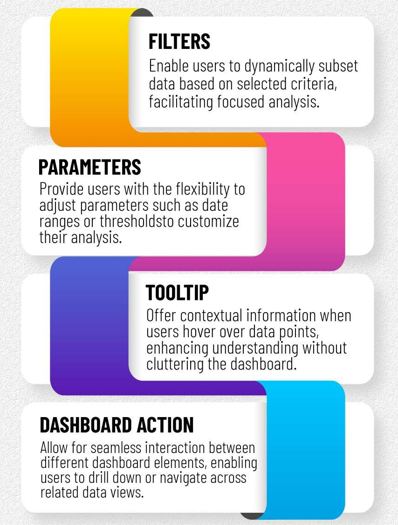
LEVERAGING INTERACTIVE FEATURES
USER FEEDBACK
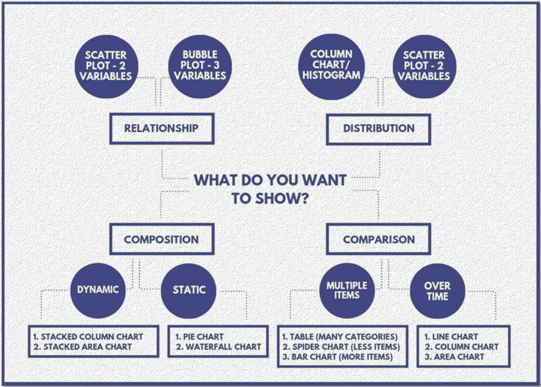
Collect user input to pinpoint issues and refine dashboard usability, focusing on improving the relationship between tables, the distribution of data points, chart composition, and time-based comparisons.
CONCLUSION
Designing compelling Tableau dashboards requires a blend of creativity, technical skill, and an understanding of user needs.
By following these principles and best practices, you can create dashboards that not only look great but also deliver meaningful insights to your audience.
Whether you’re a seasoned Tableau user or just getting started, incorporating these principles into your dashboard design process can help you create more impactful visualizations.
AI solutions partnering with businesses to solve complex challenges and thrive in the age of Data & AI.
Our managed services offering provides complete lifecycle support for your AI/ML infrastructure. This includes model retraining, drift detection, performance benchmarking, and CI/CD optimization. We deliver quarterly updates, performance audits, and advisory support for emerging AI tools and compliance standards. This ensures your AI investments remain future-proof and aligned with evolving business needs.Holistic Managed Services Program
We design and deploy intelligent virtual assistants and chatbots using cutting-edge NLP models like GPT, BERT, and Rasa. These bots handle customer support, HR services, employee onboarding, and internal queries. Integrated into platforms like MS Teams, Slack, WhatsApp, and websites, our conversational agents reduce operational costs and improve user engagement with 24/7 intelligent support.Conversational AI Program
We deliver reusable and scalable time-series forecasting models tailored for demand, inventory, and revenue predictions. Leveraging ARIMA, Prophet, LSTM, and XGBoost, our models account for seasonality, trend shifts, and external drivers. Dashboards with parameter tuning and explainability features allow business users to explore and adjust forecasts in real time. APIs enable seamless integration with ERP, planning, and sales platforms.Forecasting Factory
Our suite of AI-powered solutions helps organizations understand, engage, and retain customers. We build predictive models for churn detection, customer lifetime value, behavioral segmentation, and next-best-action. Integrated with CRMs and data platforms, our solutions drive hyper-personalized experiences and data-driven decision-making across sales, marketing, and support channels.Customer Intelligence Suite
Nice Software Solutions offers a flexible, outsourced analytics team to deliver actionable insights on demand. From data ingestion and cleansing to analysis, visualization, and reporting, our team handles the full analytics workflow. This service supports a range of business functions including marketing, finance, supply chain, and customer experience. It’s ideal for organizations seeking enterprise-quality insights without expanding internal data science headcount.Analytics-as-a-Service (AaaS)
We offer end-to-end support for building, deploying, and scaling AI/ML solutions across the enterprise. Our enablement program covers data engineering, feature extraction, model development, hyperparameter tuning, CI/CD automation, and model monitoring. We work closely with your internal teams to institutionalize best practices, build reusable frameworks, and ensure responsible AI implementation. Our technology stack includes Azure ML, MLflow, and TensorFlow Extended—enabling robust, production-grade solutions ready for business impact. AI/ML Enablement Program
Get 24/7 expert support across your data ecosystem. We provide proactive monitoring, optimization, and incident response — allowing you to focus on innovation while we ensure stability, performance, and security. From infrastructure tuning to governance enforcement, our managed services ensure continuous platform improvement and long-term business alignment.Holistic Managed Services Program
Drive operational excellence with CI/CD, automation, and governance for data pipelines. We implement best practices to increase delivery speed, data quality, and platform resilience. Our approach combines tooling, culture, and process automation to create a unified, agile data delivery ecosystem that reduces errors and accelerates time-to-insight.DataOps Transformation Initiative
Enable instant decisions with high-velocity streaming architectures. Our systems are built for low-latency insights, continuous responsiveness, and integration into mission-critical business workflows. We empower businesses to monitor dynamic data environments, detect patterns in real time, and deliver hyper-personalized experiences that drive agility and growth.Real-Time Data Enablement
Modernize your data infrastructure with minimal disruption. We ensure secure, efficient transitions to modern platforms — unlocking better performance, cost-efficiency, and long- term scalability. Our proven migration framework minimizes risk, preserves data integrity, and accelerates cloud adoption to help your organization stay competitive and innovative.Legacy Platform Migration
Bridge the scalability of data lakes with the governance of warehouses. Our Lakehouse solutions power BI, AI, and ML with a single, unified architecture designed for real-time insights and flexible analytics workloads. By merging data storage and analytical processing layers, we ensure faster data access, reduced redundancy, and scalable performance across structured and semi-structured data types.Data Lakehouse Implementation
Build an intelligent, cloud-native foundation that supports enterprise-scale analytics. We deliver automated pipelines, dynamic scaling, and optimized infrastructure to manage high- volume data operations with agility and precision. Our modern data platform solutions simplify operations, ensure data availability, and offer seamless integration with advanced analytics and AI applications — helping you unlock greater business value faster.Modern Data Platform Program
Our compliance programs are designed to help enterprises meet national and international data regulations such as GDPR, HIPAA, SOX, and RBI standards. We implement rigorous control mechanisms, audit-ready lineage documentation, encrypted data handling, and secure reporting protocols. Regulatory dashboards highlight compliance status, while automation triggers real-time alerts when violations occur. Paginated Reports are used for structured, regulator-ready formats, and Copilot helps generate policy documentation and summarize compliance risks. This ensures that your data estate is continuously monitored, documented, and aligned with regulatory frameworks.Regulatory Compliance Program
Our compliance programs are designed to help enterprises meet national and international data regulations such as GDPR, HIPAA, SOX, and RBI standards. We implement rigorous control mechanisms, audit-ready lineage documentation, encrypted data handling, and secure reporting protocols. Regulatory dashboards highlight compliance status, while automation triggers real-time alerts when violations occur. Paginated Reports are used for structured, regulator-ready formats, and Copilot helps generate policy documentation and summarize compliance risks. This ensures that your data estate is continuously monitored, documented, and aligned with regulatory frameworks.Regulatory Compliance Program
We help organizations scale BI programs without losing governance by enabling safe, self-service environments. This includes certified datasets, transformation limits, and usage protocols within user-friendly platforms. AI and Copilot guide users with compliant practices and governed insights, ensuring agility for end-users and peace of mind for data teams—fostering a collaborative analytics culture with centralized control.Governed Self-Service Enablement
Our improvement plan provides a structured approach to elevate data quality across systems. We start with an audit to find gaps, set validation rules, and deploy real time dashboards for monitoring. AI highlights anomalies, while Power Automate and bots deliver alerts and recommendations. With Copilot, we generate rule suggestions and automate documentation—building a self sustaining ecosystem that ensures high-quality data across functions.Data Quality Improvement Plan
This program is designed to create a centralized metadata hub where all data assets—structured and unstructured—are classified, cataloged, and made accessible to stakeholders across the organization. We implement catalogs using industry-standard platforms and enrich them with AI powered capabilities like smart tagging, auto - classification, and sentiment-based data descriptions. Through intuitive interfaces and Copilot-led guided search experiences, users can quickly locate relevant datasets, understand their lineage, and assess data quality before consumption. The result is reduced data hunting, increased trust, and faster decision-making.Enterprise Data Catalog Program
Our Data Governance Jumpstart program is the ideal launchpad for organizations seeking to establish foundational governance practices. We work closely with data owners, business users, and IT stakeholders to define a governance charter, assign stewardship roles, and implement the essential components of data policy management. With AI automation and Copilot-assisted policy generation, we accelerate documentation, streamline workflows, and build a scalable model for expansion. This program lays the groundwork for sustainable governance by balancing flexibility with control and setting clear expectations for data usage across the enterprise.Data Governance Jumpstart
Our managed BI services provide ongoing platform governance, user support, system optimization, and innovation rollouts. From report enhancements to AI tool integration, our experts manage the evolution of your BI environment with continuous improvements. Monthly review cycles, quarterly feature updates, and Copilot training sessions ensure that your analytics ecosystem stays future-ready and aligned with business needs.Holistic Managed Services Program
Our audit service evaluates existing dashboards and reports for effectiveness, usability, and alignment with business goals. We review visual design, user interaction flows, layout logic, and accessibility standards. With AI-powered heatmaps and Copilot-assisted refactoring, we provide actionable enhancements that elevate dashboards to modern standards—improving both clarity and engagement.Visualization Best Practices Audit
We deliver tailored dashboards focused on executive-level insights—covering critical KPIs, operational metrics, and strategic goal tracking. These dashboards are visually elevated yet functionally robust, featuring dynamic scorecards, AI-generated commentary, and drill-through paths that allow instant analysis. Alerts, workflow triggers, and automatic updates are seamlessly built-in using automation engines, ensuring that CXOs always have current, decision-grade data.Executive Dashboards Suite
Our adoption bootcamp is a structured enablement initiative designed to enhance BI fluency across user roles. We deliver interactive workshops, role-based labs, and live simulations that teach practical skills using real-world data. Features like natural language Q&A, Copilot-driven automation, and collaborative data storytelling are core to the learning process. Post-bootcamp, we track engagement and feedback, ensuring continuous skill development and BI platform utilization.Analytics Adoption Bootcamp
For enterprises struggling with outdated systems, our modernization program offers a structured roadmap to shift toward scalable, cloud-friendly BI solutions. We assess legacy architectures, plan phased transitions, and reengineer outdated reports using modern data frameworks. AI tools assist in auto-documenting reports, generating functional equivalents, and streamlining adoption. The process also includes alignment with DevOps pipelines, metadata management, and compliance frameworks.BI Modernization Program
This end-to-end program covers everything from data modeling and transformation to visualization and publishing. We handle architecture design, semantic modeling, ETL/ELT pipelines, and user-specific dashboard customization. Automation is a central focus, with scheduled refreshes, smart alerting, and AI-generated insight summaries built into the final product. The result is a fully integrated, business aligned BI environment tailored for scalability and continuous improvement.BI Implementation Program